Play Secret Hitler-Style Games Online With Friends
Service Rat is the closest free native mobile alternative to playing Secret Hitler online with friends. The host taps Online → Host and shares a four-character room code in any chat app, or switches the game to the open list so anyone can walk in without a code. Every online room comes with its own voice chat. It is free, there is no account, and up to ten people can play from anywhere in the world. New to the game? Learn the full rules before your first room.
How to host an online game in under 5 minutes
1 · Install Service Rat on every phone
It is free on Google Play and the App Store. The download is under 60 MB. Everyone needs the app: there is no browser version.
2 · Host taps "Online" → "Host a Game"
The host enters a player name. The app contacts the global server and returns a four-character room code (for example "K7F3").
3 · Share the code in any chat app
Send the room code over WhatsApp, Telegram, Discord, iMessage, or whatever your group uses. Want a full table? Flip "Open to everyone" in the lobby and the game also appears on the open list, where anyone can join without a code.
4 · Players tap "Online" → "Join Game" → pick the game or enter the code
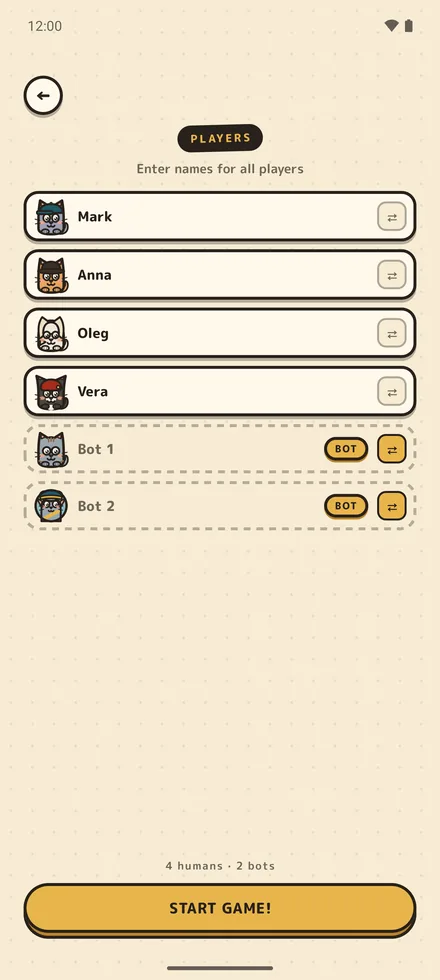
Each player enters their name, then picks the game from the open list or types the room code. They appear in the host's lobby instantly. The host can add AI bots to fill any empty slots, or remove a player from the lobby before the start.
5 · Host taps "Start" when ready
The app deals hidden roles to each player, runs every vote, and applies every prerogative automatically. There is no moderator role. Reconnect is automatic if anyone drops.
What you need
A modern phone
Android 7.0 or newer, or iOS 16 or newer. Any phone from the last six years works.
An internet connection
Mobile data or Wi-Fi. About 5 KB per second during play, so it works on slow networks.
A group of 5 to 10 players
AI bots fill empty seats. You can play with as few as one human and four bots.
No account required
No email, no password, no profile. Names are display-only and are not stored after the game ends.
Privacy and connection
Service Rat's online mode connects through a dedicated game server over TLS. The server stores no chat (there is no text chat in the app), no profile data, and no game history beyond the active session. Room codes expire two hours after the last activity. If a host lists a game on the open list, the list shows the host's player name, the room code, the number of seats taken and whether the room has voice chat, and only until the game starts. Voice chat runs in Discord, not on our server. The privacy policy explains every byte the server sees.
How online mode compares to LAN and Pass & Play
Service Rat has three multiplayer modes. Pass & Play is one phone passed around the table, best for in-person groups with one device. LAN multiplayer runs on the same Wi-Fi with each player on their own device, best for offices and game nights. Online multiplayer is for remote groups: each player joins the host's room code from anywhere in the world. Wondering how this stacks up against browser play? See how Service Rat compares to playing in a browser.
LAN multiplayer: same room, no internet
If everyone is physically together, LAN mode skips the internet entirely. The host taps LAN → Host, and the app starts a game server directly on their phone over local Wi-Fi. Other players on the same network see the game appear in the discovery list and tap it to join; there is no address to type in. It works on a cabin Wi-Fi router with no internet connection, on a plane, or on an office network: the only requirement is that all phones share the same local network.
Online multiplayer: common questions
Can I play Secret Hitler-style games online with bots?
Yes. The host can fill any empty seat with an AI bot from the lobby: you need at least one human player, and bots take the rest. Two friends plus three bots is a valid five-player room.
Do my friends need the app too?
Yes. Everyone joins from the app: there is no browser version. It is a free download under 60 MB on both Google Play and the App Store, so getting a whole group ready takes a couple of minutes.
Does it work over voice chat or Discord?
Yes. Since version 1.6.0 every online room gets its own voice channel: tap "Join voice chat" in the lobby or during the game and it opens in Discord (you need the free Discord app). Prefer Zoom, a group call or your own server? That works just as well. The app handles the hidden roles, the votes, and the board; the call carries the accusations.
Is there a private room option?
Rooms are private by default: the only way in is the host's code. A host who wants a full table can flip "Open to everyone" in the lobby to put the game on the open list, and switch it back off at any point before the start. Codes are case-insensitive and four characters long.
Can I play online with strangers?
Yes, since version 1.6.0. Online → Join shows the open games: lobbies whose hosts chose to list them, fullest first. Tap one and you are in, no code needed. The list shows the host's name, the room code, how many seats are taken and whether the room has voice chat, never the other players' names. There is no ranked matchmaking, and how many games are open depends on the time of day; if nobody is around, host your own and fill the empty seats with bots.
What happens if someone drops out mid-game?
The app keeps the seat alive with a rejoin token for up to two hours. If the dropped player rejoins from the same device, they pick up exactly where they left off. Meanwhile the screens the whole table confirms, like the vote result, stop waiting for them; a ballot or their own turn still does.
How many players can join one room?
Up to 10 players per room, including AI bots. The role mix balances automatically (5 players = 3 Cats, 1 Sellout, 1 Rat; 10 players = 6 Cats, 3 Sellouts, 1 Rat).
Does online mode work on slow connections?
Yes. Each player exchanges roughly 5 KB per second with the server. Cellular networks and weak Wi-Fi both work.
Questions about the game itself: roles, pricing, privacy, languages? They live in the full Service Rat FAQ.
Install Service Rat and host your first online room: free, no account, room codes work worldwide.